Faced with the repetitive task of spinning up secure ‘Landing Zones’ for my Terraform projects and bootstrapping an initial Terraform codebase, I decided to create a vending machine for that. My Terraform UseCase Vending solves that problem by packaging every required building block into a single reproducible workflow.
Tip
GitHub Repository of the ‘Terraform UseCase Vending’: vMarkusK/terraform-usecase-vending
Example GitHub Repository of a vended UseCase: vMarkusK/terraform-azure-aabb
My Module is inspired by two awesome projects:
Development workflow
The setup optimized for my development workflow:
- A new GitHub branch is created for each new feature.
- Once the feature is complete, a pull request (PR) is submitted to merge it into the main branch.
- A GitHub action is executed as part of the PR. This validates the code (TFlint), performs a security scan (Trivy), and generates a plan.
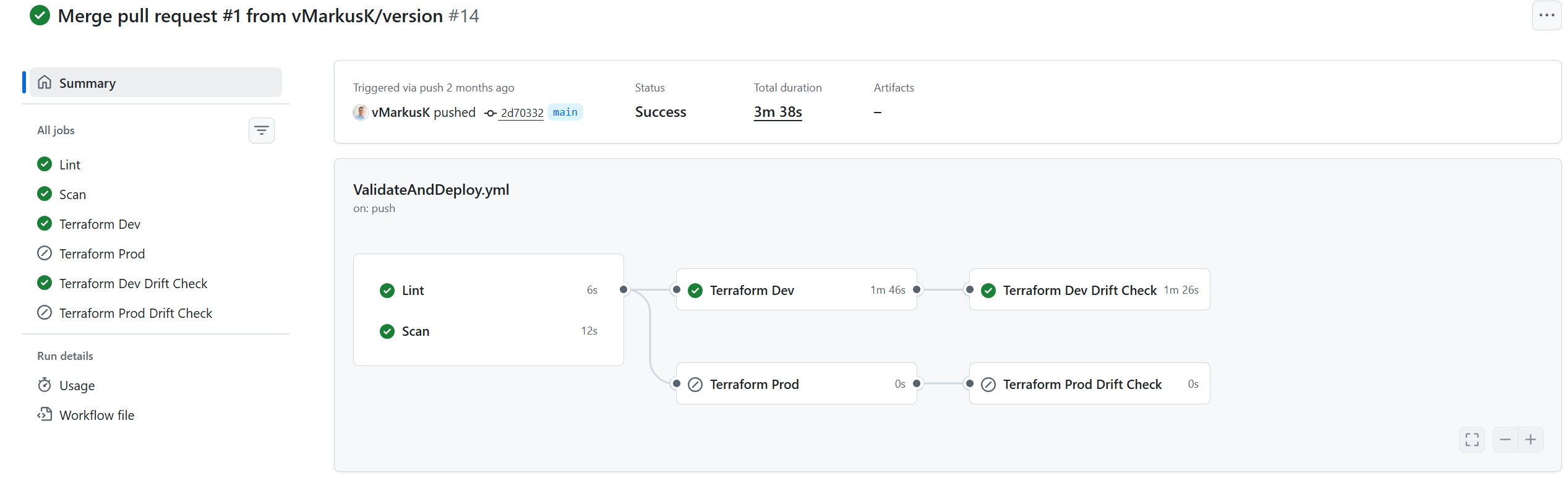
- If the pull request is merged into the main branch, a deployment is carried out in the development environment via a GitHub action.
- A drift-detection task performs a final verification.
- The result is then manually checked (human in the loop).
- If the desired result is achieved, a GitHub release is created, triggering a GitHub action that deploys to the production environment.
- Another drift-detection task performs a final verification.
The drift-detection is implemented as terraform plan with detailed exitcode:
|
|
Warning
Weaknesses in the current process:
- “Dirty Main” Risk: There is no real ’terraform apply’ prior to merging into the main branch, and the ‘human in the loop’ is also after merging into the main branch.
- Possible Solution: A ’terraform apply’ Task with approval during PR, target Dev-Environment.
- Possible drift between Plan and Apply: Creating a new Plan for the ‘Apply’ task could lead to inconsistent results between confirmed and real results.
- Possible Solution: Hand over a plan file from the ‘Plan’ task to the ‘Apply’ task.
- Possible drift between Dev and Prod: Due to the delay between the Dev and Prod deployments, there is a possibility of drift between external dependencies. This is also possible between the ‘Plan’ and ‘Apply’ tasks, but it is less likely.
- Possible Solution: Use a Dependency Lock File to guarantee consistency.
Components
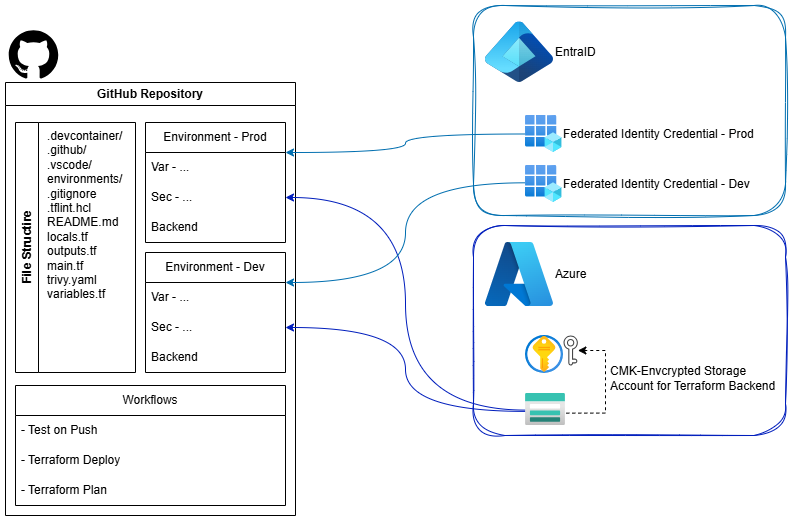
- Azure Identity & Terraform State
- Creates EntraID Federated Identity Credential
- Sets up an Azure Storage Account for Terraform remote state (with CMK encryption and security best practices)
- GitHub Integration
- Creates a GitHub repository with:
- Two deployment environments
- Secrets and variables for deployments
- Branch protection rule
- Creates a GitHub repository with:
- Project Starter Code
- Adds a basic Terraform Azure codebase with:
- Minimal Terraform File- and Variables-Structure
- GitHub Copilot instructions
- GitHub devcontainer configuration
- GitHub Actions for deployments
- VSCode configuration
- Trivy, TFLint configuration files for security scan and linting
- Adds a basic Terraform Azure codebase with:
Azure Identity
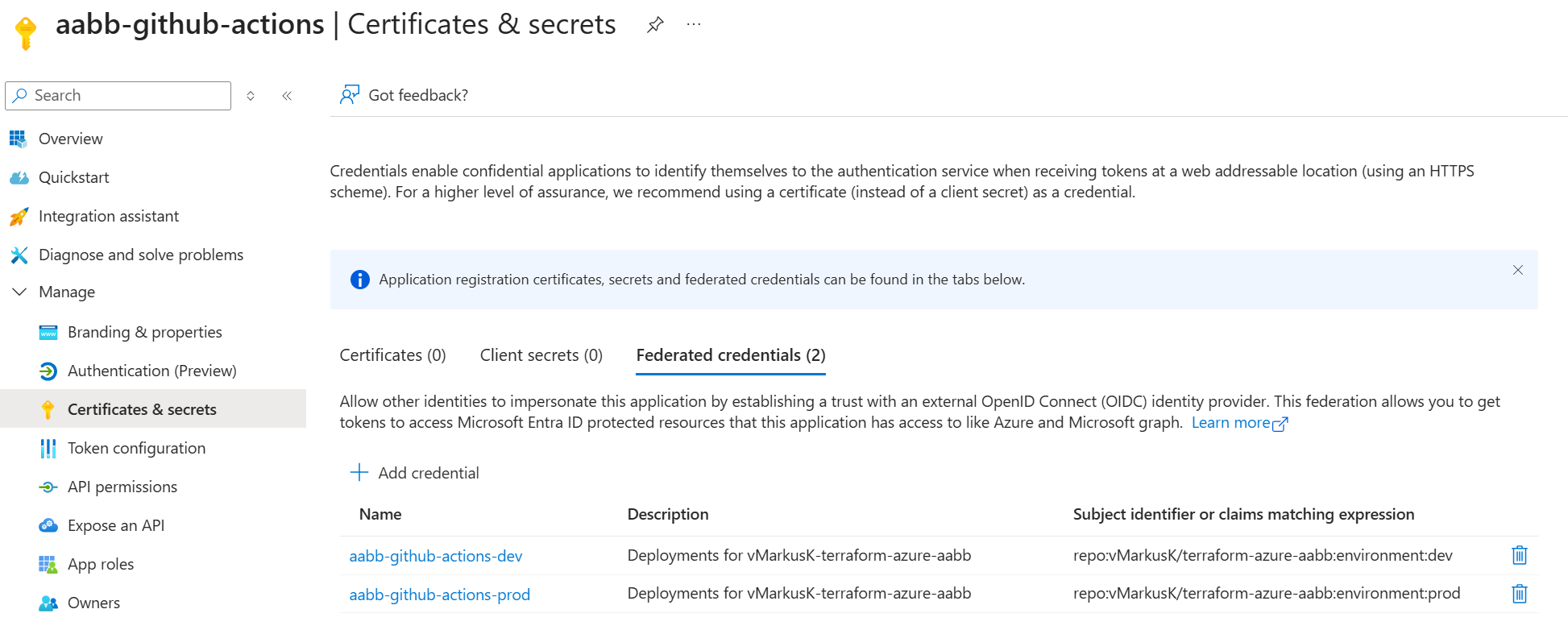
For each UseCase an individual EntraID Federated Identity Credential-Pair (one per environment) is created. The Credential uses the GitHub Environment as identifier, e.g. ‘repo:vMarkusK/terraform-azure-aabb:environment:dev’.
The following chapters will cover how to configure GitHub with OIDC for Terraform deployments, including remote state.
Terraform State
In one of my previous blog posts, I already shared my Terraform AzureRM Backend Automation. Most of the code from this project was reused and integrated with the other components.
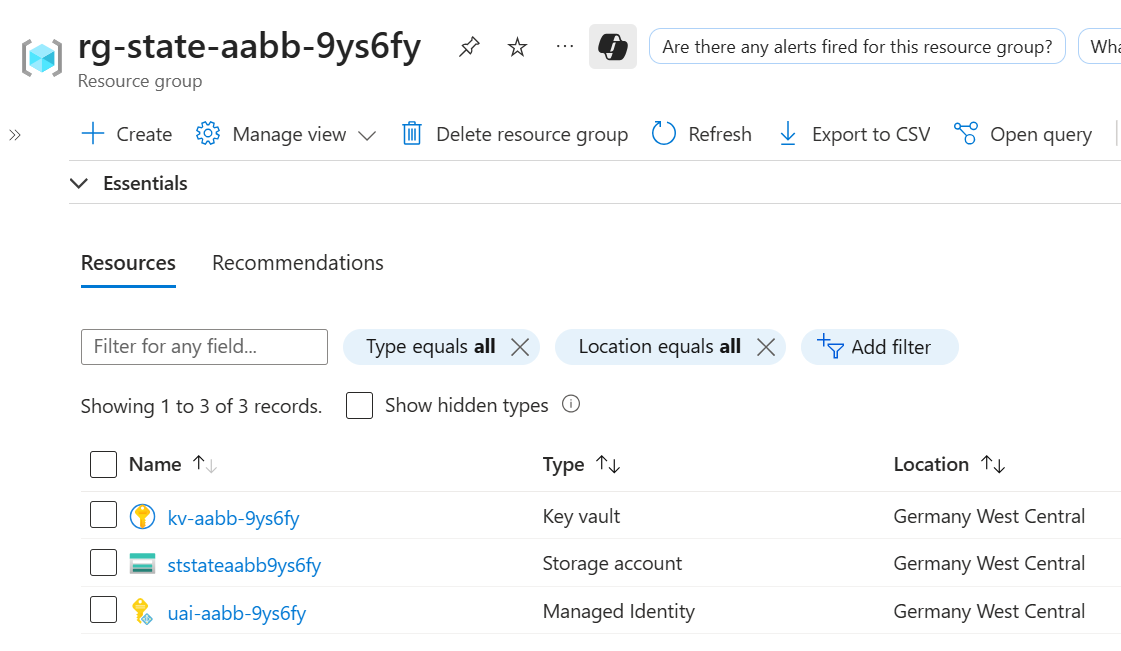
The Azure Storage Account and the prerequisites for the encryption are placed in a dedicated Resource Group.
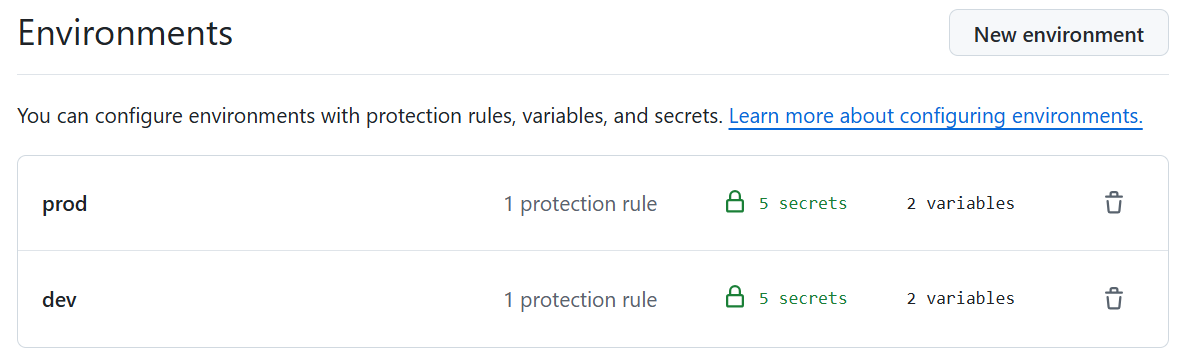
GitHub environments
My Terraform projects typically follow the ‘single stack with configuration files per environment’ pattern. This involves creating two GitHub environments: Production and Development.
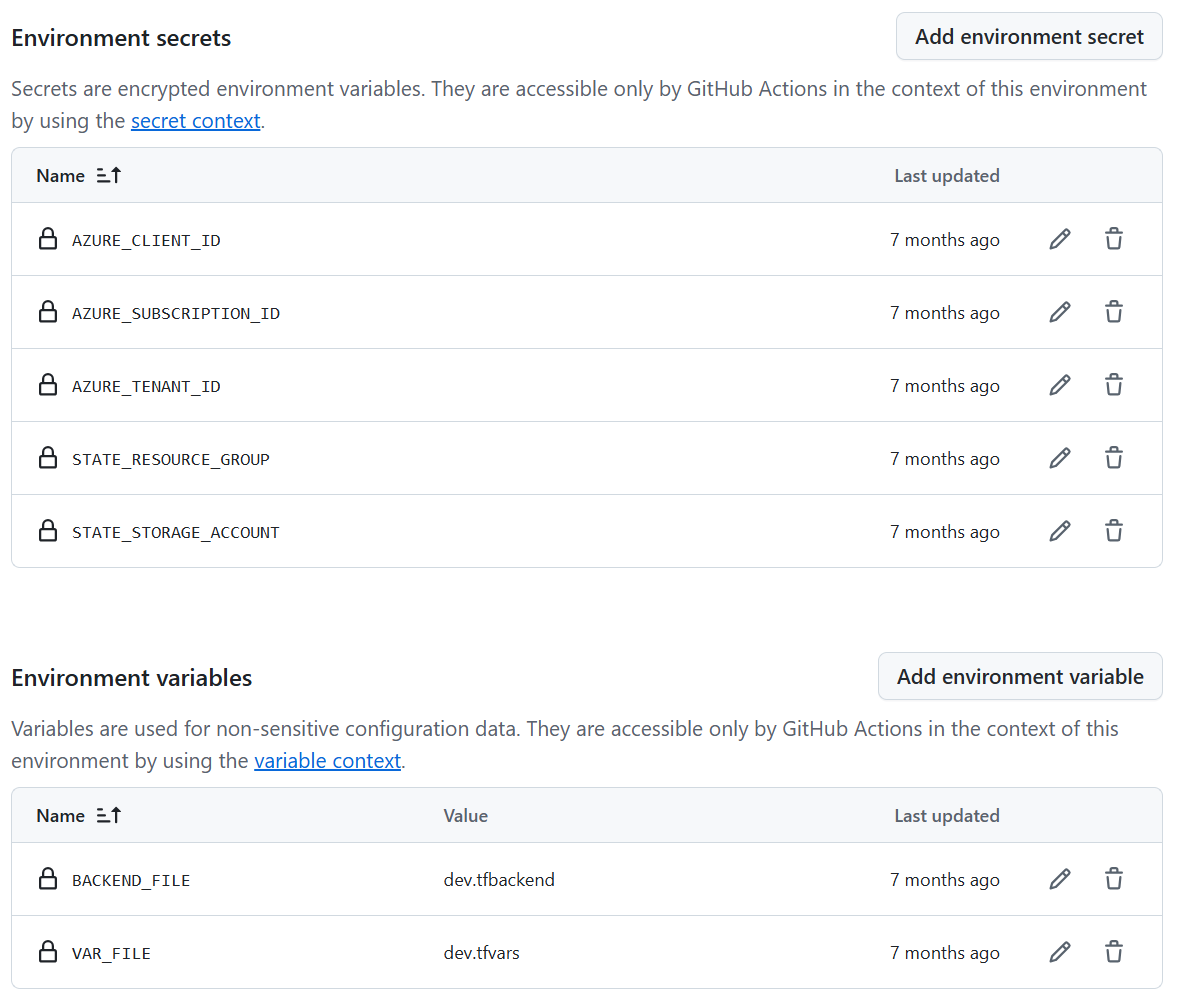
Each GitHub environment (Production and Development) contains the unique configurations for the stage.
GitHub Branch protection rule
The branch protection rule can be difficult to manage with Terraform if you regularly update some of the files. I decided to temporarily remove the branch protection rule when a ‘managed file’ needs to be updated. The other option would be to create a branch and merge with a pull request (PR). This might be cleaner, but it would be much more complex to implement.
Temporarily removing branch protection is implemented using explicit dependencies and the ‘replace_triggered_by’ lifecycle attribute:
|
|
Project Starter Code
The vended project comes with a broad set of files. Some are supporting files (e.g. devcontainer.json), while others are required for the Terraform module.
Tip
The vending machine ‘fully manages’ critical components, such as workflows, to allow centralized rollouts of enhancements, fixes, and new features.
Most files are created 1:1, but some require templating with variables to fit the target project. Here are both examples of how the vending machine manages files in the target repository:
|
|
Repo content after vending:
.
├── .devcontainer
│   └── devcontainer.json
├── .github
│   ├── copilot-instructions.md
│   └── workflows
│       ├── Test.yml
│       ├── ValidateAndDeploy.yml
│       └── ValidateAndPlan.yml
├── .gitignore
├── .tflint.hcl
├── .vscode
│   ├── extensions.json
│   └── settings.json
├── README.md
├── environments
│   ├── dev.tfbackend
│   ├── dev.tfvars
│   ├── prod.tfbackend
│   └── prod.tfvars
├── locals.tf
├── main.tf
├── outputs.tf
├── trivy.yaml
└── variables.main.tf
Environments
The files in the Environments folder are the glue that hold the ‘single stack with configuration files per environment’ pattern together. There are dedicated backend configurations and variable values for each environment.
Tip
I try to control all differences between environments using variable values. Conditions inside the code are often opaque and prone to errors.
GitHub Workflows
Pull Request
The workflow is triggered by pull requests (PRs) to reduce the risk of failed deployments and ensure code quality.
- Workflow Trigger
- Executes on PR creation or updates (
opened,synchronize) - Can be triggered manually via
workflow_dispatch
- Lint Job
- Runs TFLint to validate Terraform code syntax
- Minimum severity level: error
- Uses latest TFLint version
- Scan Job
- Executes Trivy security scanner in IaC (Infrastructure as Code) mode
- Fails on CRITICAL, HIGH, or MEDIUM severity findings
- Prevents insecure configurations from proceeding
- Terraform Dev Job (Depends on Lint & Scan)
- Network Access: Dynamically whitelists GitHub Runner IP to access hardened Storage Account
- Authentication: Uses Azure OIDC (no secrets needed)
- Steps:
- Azure login via federated identity
- Whitelist runner IP (required for state access)
- Checkout code
- Initialize Terraform with backend config
- Format check
- Validation
- Generate plan
- Remove runner IP from whitelist (cleanup)
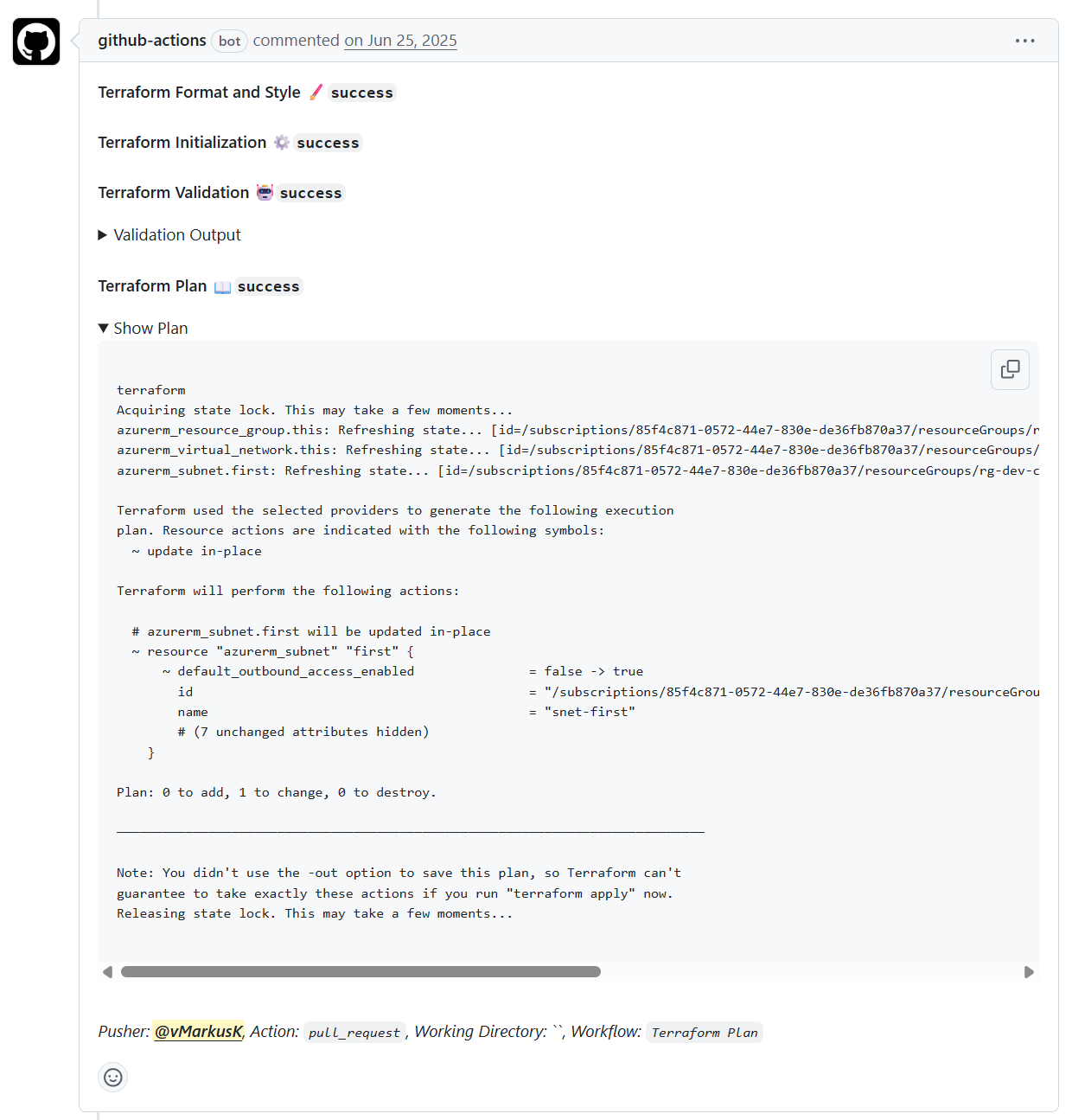
- Post plan summary as PR comment with collapsible sections
Push to Main or Release
This workflow is triggered by pushes to the main branch and by release creation. Both triggers result in a deployment (terraform apply), but to different environments.
- Workflow Trigger
- Executes on push to
mainbranch - Executes on GitHub
releasecreation - Can be triggered manually via
workflow_dispatch
- Lint Job
- Runs TFLint to validate Terraform code syntax
- Minimum severity level: error
- Uses latest TFLint version
- Scan Job
- Executes Trivy security scanner in IaC (Infrastructure as Code) mode
- Fails on CRITICAL, HIGH, or MEDIUM severity findings
- Prevents insecure configurations from proceeding
- Terraform Dev Job (Only on push to main)
- Network Access: Dynamically whitelists GitHub Runner IP
- Authentication: Uses Azure OIDC (no secrets needed)
- Steps:
- Azure login via federated identity
- Whitelist runner IP (required for state access)
- Checkout code
- Initialize Terraform with backend config
- Apply changes to development environment
- Remove runner IP from whitelist (cleanup)
- Terraform Prod Job (Only on release)
- Network Access: Dynamically whitelists GitHub Runner IP
- Authentication: Uses Azure OIDC (no secrets needed)
- Steps:
- Azure login via federated identity
- Whitelist runner IP (required for state access)
- Checkout code
- Initialize Terraform with backend config
- Apply changes to production environment
- Remove runner IP from whitelist (cleanup)
- Drift Detection Jobs (Both environments)
- Runs after Dev and Prod deployments complete
- Performs terraform plan to detect state drift
- Alerts if actual infrastructure diverges from desired state